> For the complete documentation index, see [llms.txt](https://doc.nextbot.ru/llms.txt). Markdown versions of documentation pages are available by appending `.md` to page URLs; this page is available as [Markdown](https://doc.nextbot.ru/functional/setting-up-agent/golosovye-soobsheniya-i-izobrazheniya/video.md).
# Видео
Данный функционал позволяет включать или отключать распознавание видео ИИ-агентом, в том числе по ссылке на YouTube.
Перейти к блоку «Видео»
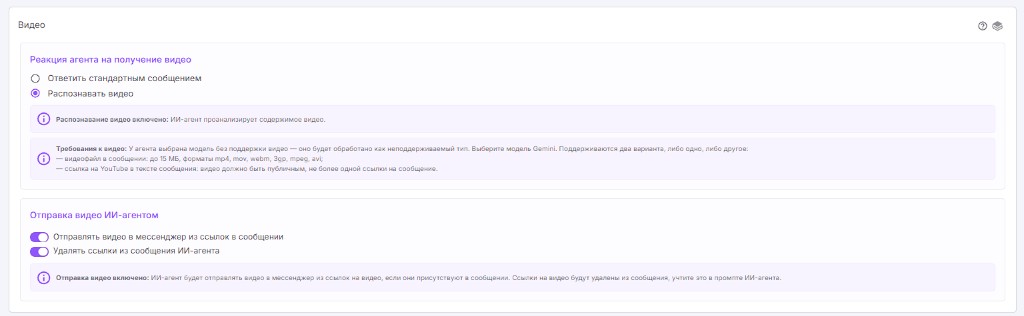
### Реакция агента на получение видео
Если включена опция **"Ответить стандартным сообщением"**, при получении видео оно не будет отправлено модели для формирования ответа, а будет отправляться стандартное сообщение, которое вы сами настроили.
Если включена опция **"Распознавать видео"**, ИИ-агент проанализирует содержимое видео.
Распознавание доступно в двух вариантах:
* **Видеофайл в сообщении** — до **15 МБ**. Поддерживаемые форматы: mp4, mov, webm, 3gp, mpeg, avi.
* **Ссылка на YouTube в тексте сообщения** — видео должно быть **публичным**, и в сообщении допускается **не больше одной ссылки**.
{% hint style="info" %}
Распознавание видео работает на моделях, которые поддерживают видео: семейство **Gemini**, **Kimi K3** и **GLM 5.3 Flash**. Если у агента выбрана модель без поддержки видео, файл будет обработан как неподдерживаемый тип — сработает логика блока [«Файлы»](/functional/setting-up-agent/faily.md).
{% endhint %}
### Отправка видео ИИ-агентом
**Отправлять видео в мессенджер из ссылок в сообщении** — если эта опция включена, ИИ-агент будет отправлять видео в мессенджер из ссылок на видео, если они присутствуют в сообщении. Укажите ссылки в промпте или добавьте в базу знаний. Ссылку на файл можно скопировать из [Облака](/functional/oblako.md) и вставить в инструкцию агента.
**Удалять ссылки из сообщения ИИ-агента** — при активировании этой опции ссылки на видео будут удалены из сообщения. Учтите это в промпте ИИ-агента: клиент увидит само видео, а не ссылку в тексте.
---
# Agent Instructions
This documentation is published with GitBook. GitBook is the documentation platform designed so that both humans and AI agents can read, navigate, and reason over technical content effectively. Learn more at gitbook.com.
## Querying This Documentation
If you need additional information that is not directly available in this page, you can query the documentation by asking a question.
Perform an HTTP GET request on the following URL with the `ask` and `goal` query parameters:
```
GET https://doc.nextbot.ru/functional/setting-up-agent/golosovye-soobsheniya-i-izobrazheniya/video.md?ask=&goal=
```
`ask` is the immediate question: it should be specific, self-contained, and written in natural language.
`goal` is what the user is ultimately trying to achieve, the reason they need the answer. Sharing it helps GitBook give you a better, more relevant answer. A goal is most helpful when it describes the outcome the user wants rather than restating the question. For example, with `ask=how do I create an API token`, a goal like `automate deployments from our CI pipeline` lets GitBook tailor the answer to that use case.
The response will contain a direct answer to the question and relevant excerpts and sources from the documentation.
Use this mechanism when the answer is not explicitly present in the current page, you need clarification or additional context, or you want to retrieve related documentation sections.