> For the complete documentation index, see [llms.txt](https://doc.nextbot.ru/llms.txt). Markdown versions of documentation pages are available by appending `.md` to page URLs; this page is available as [Markdown](https://doc.nextbot.ru/functional/partnerskii-kabinet/kabinet-partnera/moi-akkaunt.md).
# Мой аккаунт
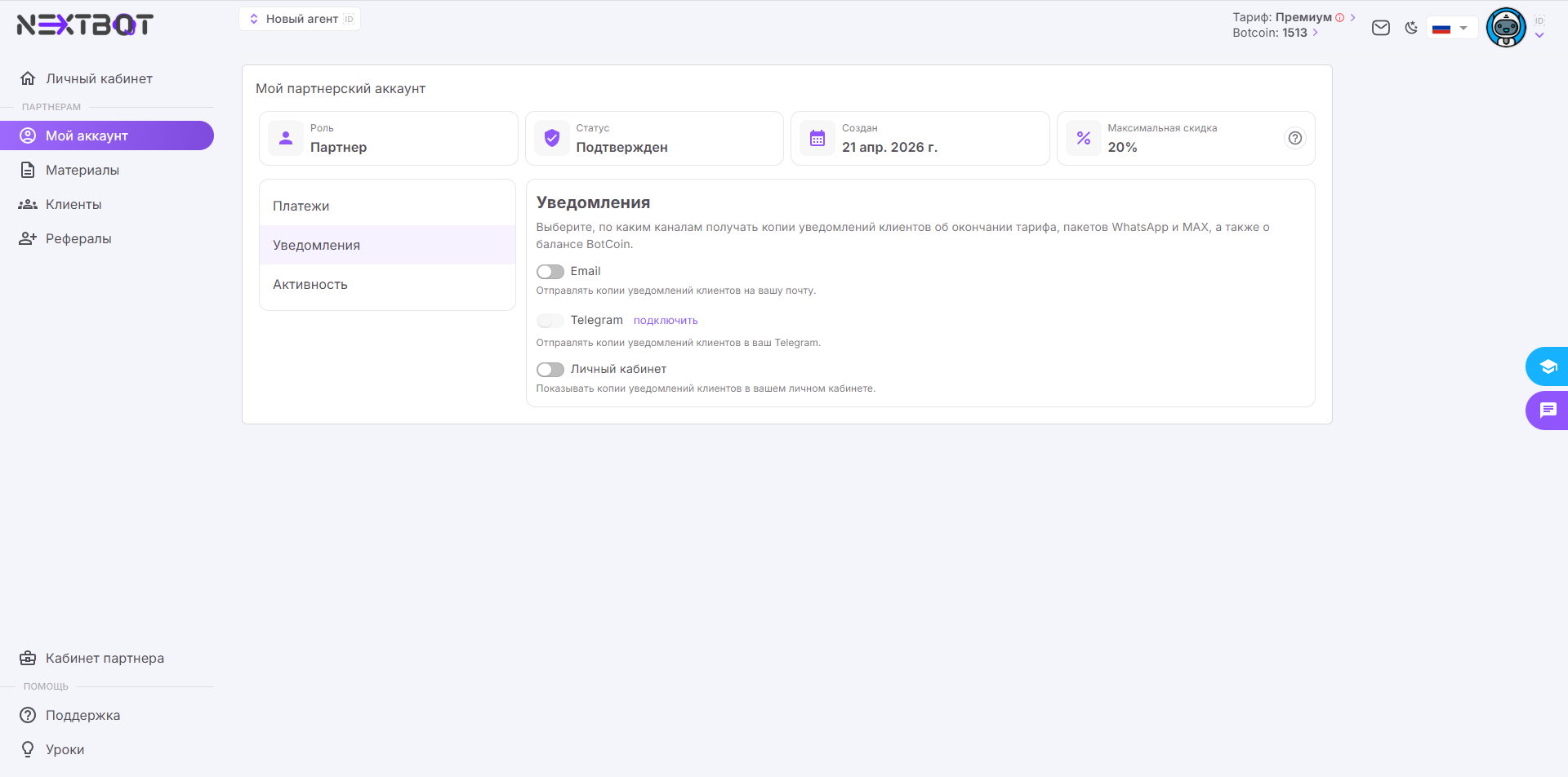
Раздел «Мой аккаунт» в кабинете партнёра Nextbot
Раздел содержит общую информацию о партнёрском аккаунте и три вкладки: «Платежи», «Уведомления», «Активность».
## Информация об аккаунте
В верхней части раздела отображаются четыре карточки:
* **Роль** — статус пользователя в системе.
* **Статус** — статус партнёрского аккаунта.
* **Создан** — дата создания партнёрского аккаунта.
* **Максимальная скидка** — размер скидки, доступной партнёру для оплаты подписок клиентов.
## Платежи
На вкладке отображается история платежей за клиентов: оплаченные подписки, пакеты BotCoin, каналы WhatsApp и MAX.
## Уведомления
На вкладке настраиваются каналы, по которым партнёр получает копии уведомлений клиентов об окончании тарифа, пакетов WhatsApp и MAX, а также о балансе BotCoin.
Доступны три канала:
* **Email** — отправка копий уведомлений на почту партнёра, указанную при регистрации аккаунта.
* **Telegram** — отправка копий уведомлений в Telegram.
* **Личный кабинет** — отображение копий уведомлений в личном кабинете партнёра.
## Активность
На вкладке отображается информация о клиентах, которые вступили или вышли из партнёрской команды.
---
# Agent Instructions
This documentation is published with GitBook. GitBook is the documentation platform designed so that both humans and AI agents can read, navigate, and reason over technical content effectively. Learn more at gitbook.com.
## Querying This Documentation
If you need additional information that is not directly available in this page, you can query the documentation by asking a question.
Perform an HTTP GET request on the following URL with the `ask` and `goal` query parameters:
```
GET https://doc.nextbot.ru/functional/partnerskii-kabinet/kabinet-partnera/moi-akkaunt.md?ask=&goal=
```
`ask` is the immediate question: it should be specific, self-contained, and written in natural language.
`goal` is what the user is ultimately trying to achieve, the reason they need the answer. Sharing it helps GitBook give you a better, more relevant answer. A goal is most helpful when it describes the outcome the user wants rather than restating the question. For example, with `ask=how do I create an API token`, a goal like `automate deployments from our CI pipeline` lets GitBook tailor the answer to that use case.
The response will contain a direct answer to the question and relevant excerpts and sources from the documentation.
Use this mechanism when the answer is not explicitly present in the current page, you need clarification or additional context, or you want to retrieve related documentation sections.