> For the complete documentation index, see [llms.txt](https://doc.nextbot.ru/llms.txt). Markdown versions of documentation pages are available by appending `.md` to page URLs; this page is available as [Markdown](https://doc.nextbot.ru/functional/functions/sending-result/adminu-v-messendzher/whatsapp.md).
# WhatsApp
Получение отчетов в WhatsApp
Для отправки отчетов в WhatsApp\* выполните следующие шаги:
1. Подключите [WhatsApp](/functional/integrations/whatsapp.md)
2. Перейдите на страницу [настроек WhatsApp](https://app.nextbot.ru/socials?tab=WhatsAppSettings)
3. Задайте пароль администратора
4. В зависимости от того где вы хотите получать отчеты, отправьте пароль администратора:
1. **Контакту, к которому подключён ИИ-Агент** — если хотите получать заявки в личные сообщения.
2. **В группу, в которой присутствует контакт с подключённым ИИ-Агентом.** Чтобы получить права администратора, должна быть включена опция **«Отвечать в группе»**. После этого её можно отключить, если вы не хотите, чтобы ИИ-Агент отвечал в чате, а только отправлял отчёты.
5. Откройте нужную функцию.
6. В разделе **«Действия»** включите опцию **«Админу в мессенджер»** и выберите **WhatsApp**.
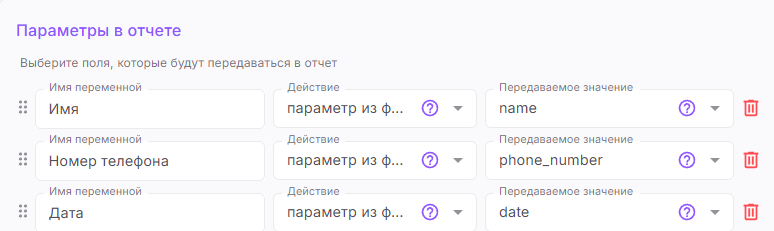
7. Настройте параметры отчёта. Подробнее о переменных в [статье](/functional/functions/sending-result/peredavaemye-znacheniya-v-otchete-ili-v-deistvii.md)
8. Сохраните функцию.
9. **Не забудьте прописать инструкции ИИ-Агенту** для использования функции.
\**Принадлежат компании Meta, которая признана экстремистской организацией и запрещена в РФ*
---
# Agent Instructions
This documentation is published with GitBook. GitBook is the documentation platform designed so that both humans and AI agents can read, navigate, and reason over technical content effectively. Learn more at gitbook.com.
## Querying This Documentation
If you need additional information that is not directly available in this page, you can query the documentation dynamically by asking a question.
Perform an HTTP GET request on the current page URL with the `ask` query parameter, and the optional `goal` query parameter:
```
GET https://doc.nextbot.ru/functional/functions/sending-result/adminu-v-messendzher/whatsapp.md?ask=&goal=
```
`ask` is the immediate question: it should be specific, self-contained, and written in natural language.
`goal` is optional and describes the broader end goal you are ultimately trying to accomplish on behalf of the user. GitBook uses it to tailor the answer towards what is most useful for that goal.
The response will contain a direct answer to the question and relevant excerpts and sources from the documentation.
Use this mechanism when the answer is not explicitly present in the current page, you need clarification or additional context, or you want to retrieve related documentation sections.