> For the complete documentation index, see [llms.txt](https://doc.nextbot.ru/llms.txt). Markdown versions of documentation pages are available by appending `.md` to page URLs; this page is available as [Markdown](https://doc.nextbot.ru/functional/functions/sending-result/adminu-v-messendzher/max.md). Agents can also search and read this documentation through its [MCP server](https://doc.nextbot.ru/~gitbook/mcp).
# MAX
Получение отчетов в MAX
{% hint style="info" %}
Эта инструкция относится к подключению `MAX`.
Для `MAX Bot` используйте отдельную статью [MAX Bot](https://doc.nextbot.ru/functional/functions/sending-result/adminu-v-messendzher/max-bot.md).
{% endhint %}
Для отправки отчетов в MAX выполните следующие шаги:
1. Подключите [MAX](https://doc.nextbot.ru/functional/integrations/max/lichnyi-max.md)
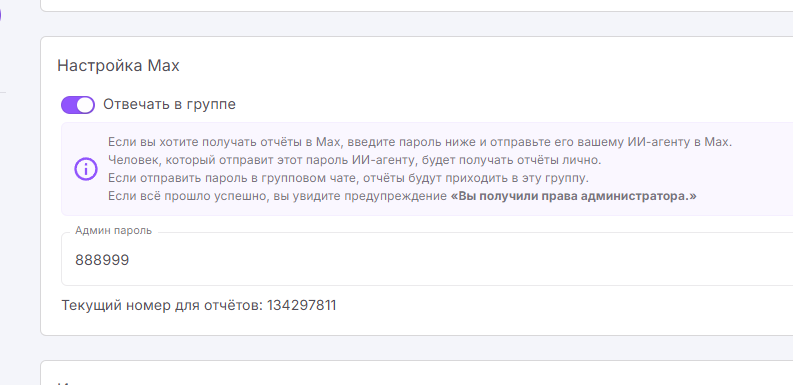
2. Перейдите на страницу [настроек MAX](https://app.nextbot.ru/integrations?tab=MaxSettings)
3. Задайте пароль администратора
4. В зависимости от того, где вы хотите получать отчёты, отправьте пароль администратора:
1. **Контакту, к которому подключён ИИ-Агент** — если хотите получать заявки в личные сообщения.
2. **В группу, в которой присутствует контакт с подключённым ИИ-Агентом.** Чтобы получить права администратора, должна быть включена опция **«Отвечать в общих чатах MAX»**. После этого её можно отключить, если вы не хотите, чтобы ИИ-Агент отвечал в чате, а только отправлял отчёты.
5. Откройте нужную функцию.
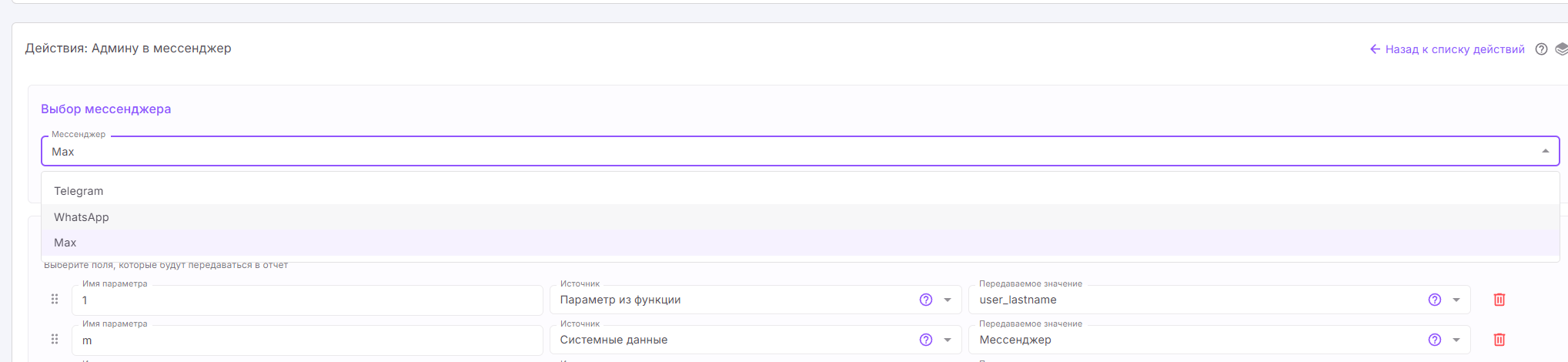
6. В разделе **«Действия»** включите опцию **«Админу в мессенджер»** и выберите **MAX**.
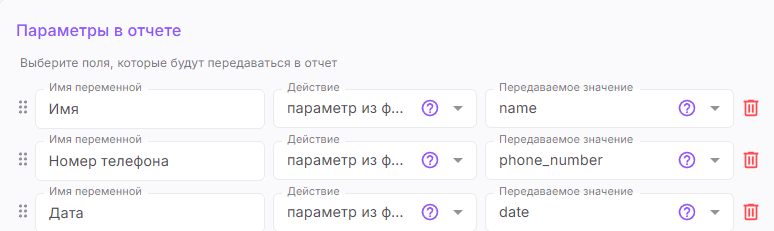
7. Настройте параметры отчёта. Подробнее о переменных в [статье](https://doc.nextbot.ru/functional/functions/sending-result/peredavaemye-znacheniya-v-otchete-ili-v-deistvii.md)
8. Сохраните функцию.
9. **Не забудьте прописать инструкции ИИ-Агенту** для использования функции.
---
# Agent Instructions
This documentation is published with GitBook. GitBook is the documentation platform designed so that both humans and AI agents can read, navigate, and reason over technical content effectively. Learn more at gitbook.com.
## Querying This Documentation
If you need additional information that is not directly available in this page, you can query the documentation by asking a question.
Perform an HTTP GET request on the following URL with the `ask` and `goal` query parameters:
```
GET https://doc.nextbot.ru/functional/functions/sending-result/adminu-v-messendzher/max.md?ask=&goal=
```
`ask` is the immediate question: it should be specific, self-contained, and written in natural language.
`goal` is what the user is ultimately trying to achieve, the reason they need the answer. Sharing it helps GitBook give you a better, more relevant answer. A goal is most helpful when it describes the outcome the user wants rather than restating the question. For example, with `ask=how do I create an API token`, a goal like `automate deployments from our CI pipeline` lets GitBook tailor the answer to that use case.
The response will contain a direct answer to the question and relevant excerpts and sources from the documentation.
Use this mechanism when the answer is not explicitly present in the current page, you need clarification or additional context, or you want to retrieve related documentation sections.